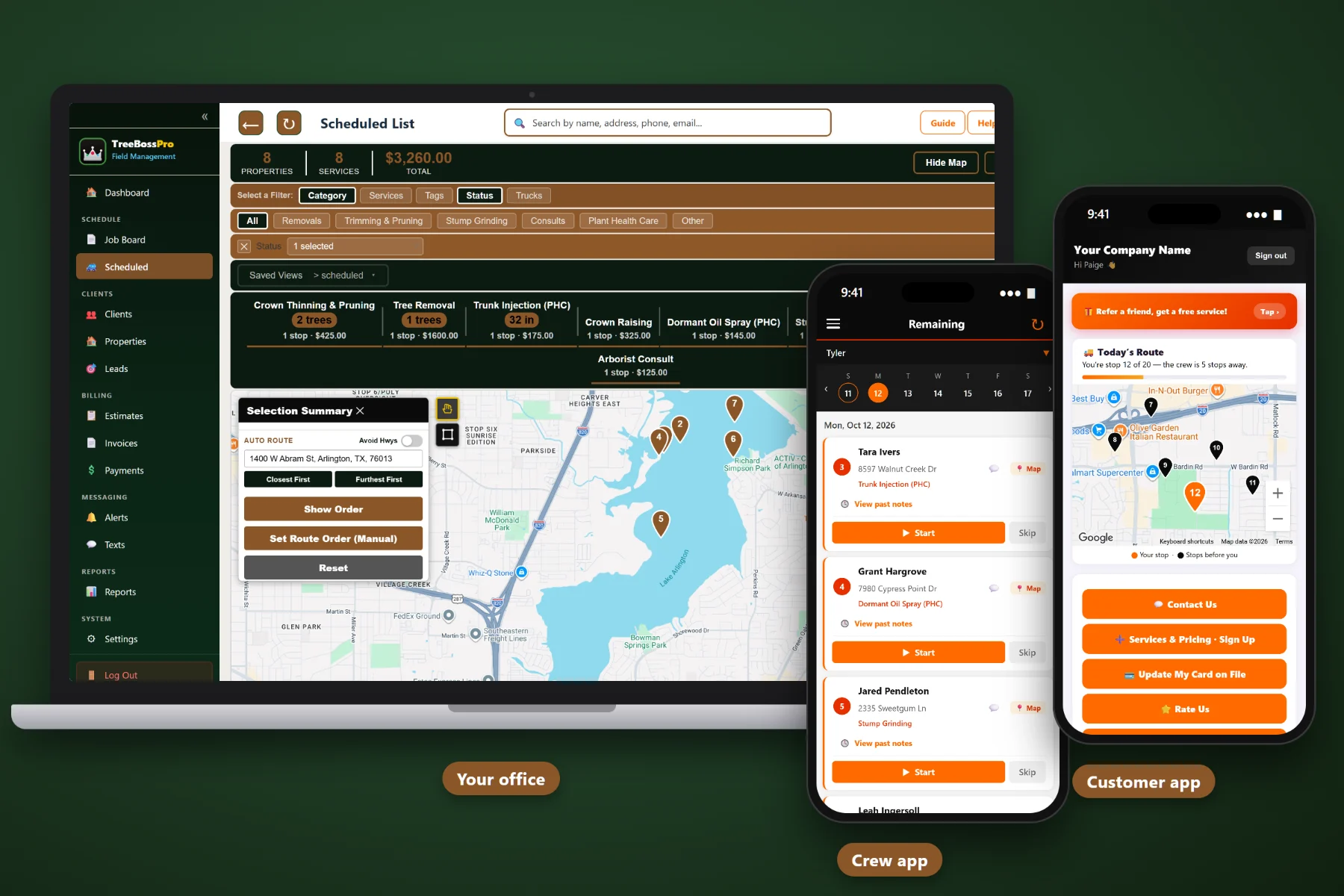
Running a tree company means juggling removals, pruning cycles, storm calls at dawn, climbers and groundies, and a pile of estimates nobody followed up on. TreeBossPro puts your properties, estimates, crews, and billing in one place so you can add a crew, hire a climber, and take on more work without the whole business living in your head.
TreeBossPro starts at $59/month, and it covers the whole job: the property record, the estimate, the schedule, the crew, the invoice, and the review request afterward. No per-user fees, so hiring a climber or a groundie never means rethinking your software bill.
Number of trees, DBH, tree height, gate codes, access notes, and drop zones saved on every property, so the crew knows where the chipper goes before they pull in.
Recurring jobs put pruning cycles and plant health care visits on the schedule automatically, so repeat work never depends on someone remembering to call.
Confirmations, reminders, and on-the-way alerts go out automatically, and the office texts customers from the system instead of a personal phone.
Invoice straight from completed jobs, keep a card on file, take prepayments, and auto-bill recurring programs. Close the gap between the last limb and the money landing.
Give office staff and crew leads their own logins with role-based access. Never billed per user, so every climber and groundie can see the plan.
Crews see their job list, route, notes, and gate codes, take photos, track time, start and complete jobs, and send one-tap on-the-way and arrival alerts.
A tree on a roof cannot wait. A deadwood prune can. The job board and scheduled list show every approved job by category, so when an emergency comes in you can see what moves, tell the bumped customer right away, and slide routine work back in once things settle. Nothing gets lost on a whiteboard.
The best system in the world is useless if your climbers go back to texting you for addresses. TreeBossPro keeps the office side complete and the crew side simple, so the whole company runs from the same information.
Import your active clients and properties by CSV and add the tree details you already know. Old tickets can follow later. Start with what the crew needs tomorrow.
Lead, estimate, online approval, job board, completed job, invoice, payment. Each step picks up where the last left off, so nobody retypes the same address three times.
Today's jobs and route, the gate code, the drop zone, the tree notes, a camera for photos, time tracking, and a complete button. That is the whole job on a phone.
Estimate follow-ups, booking confirmations, invoices, and auto-billing run on their own, whether you are in the tree, at an estimate, or finally taking a day off.
One crew and an owner who climbs can run on memory, a whiteboard, and a group text. Two crews and a hired climber cannot.
The day you add a second crew is the day you find out how much of the business lives only in your head. Where the chipper can park. Which side of the fence the drop zone is on. What the gate code is. Which customer approved the stump and which only approved the removal. None of that transfers on a whiteboard.
Generic field service software treats a tree job like any other service call, with DBH and access notes crammed into a notes field. TreeBossPro is built around how tree work actually runs. Start with Tree Service Business Software: The Complete Guide for Tree Company Owners.
Get the records, the schedule, and the billing out of your head and into one system, and growth stops feeling like chaos.
Every tool in TreeBossPro serves one of three jobs: remember what matters about each property, get the right crew to the right trees, and turn finished work into collected money.
Keep clients and properties separate, with multiple properties per client. Record number of trees, DBH, tree height, crew notes, custom fields, tags, service history, and crew photos.
See every approved job, schedule it to a crew and a day, and move work around when a storm call comes in without losing anything.
See jobs on the map, group work by area, and let auto-routing order the stops so crews spend the day cutting instead of driving.
Removals, Trimming & Pruning, Stump Grinding, Plant Health Care, Storm & Emergency, and Consults, so you can see how each line of work performs.
Put pruning cycles and PHC programs on a recurring schedule so each visit lands on the board automatically.
Record what was applied where for plant health care work, so application records live with the job and the property.
Job list, route, notes, gate codes, start and complete, photos, and one-tap on-the-way and arrival alerts, all from the crew leader's phone.
Crews track their time in the app, so hours are on record and easy to check against the work that got done.
Give office staff and crew leads their own logins with access set by role, so everyone sees what they need and nothing they shouldn't.
Confirmations, reminders, and invoices go out automatically, and the office can text customers back and forth from the system.
Customers see visits and invoices, pay online, keep a card on file, choose their alerts, and watch the live crew map on service day.
Referral and rate-us options in the customer app make it easy for happy customers to spread the word.
Capture every new inquiry and follow it through to an estimate and a booked job, so storm-season calls do not slip through.
Send estimates the same day, let customers approve from their phone, and let automatic follow-up chase the ones that go quiet.
Invoice from completed jobs without retyping, with sales tax calculated, and see what is paid and what is still out.
Keep cards on file, auto-bill recurring programs, take online payments, and collect prepayments on big removals.
Jobs, revenue, and unpaid invoices in one place, so a weekly check-in takes minutes instead of an afternoon.
Bring your client and property list over from a spreadsheet or another system in one go.
The jump from one crew to two is where most tree company owners feel the strain. TreeBossPro gives every crew the information you used to carry in your head, and gives you a clear view of the day without riding along. Thinking about that step? Read When to Add a Second Crew to Your Tree Business.
Tree work stalls when estimates go quiet, and cash gets tight when invoices go out a week late. TreeBossPro keeps the whole chain moving: estimate, online approval, scheduled job, completed job, invoice, payment. Want the money side first? Read Getting Paid Faster in a Tree Business: Card on File, Prepayments, and Auto-Billing.
Hiring a climber should be a business decision, not a software decision. Pick the plan that fits your stage and move up when the company does.
14-day free trial. No credit card required.
Owner-level guides on storm season, adding crews, hiring climbers and groundies, new service lines, knowing your numbers, reviews, referrals, and growing from one crew to several. Start with the first and work forward.
Yes. It stores number of trees, DBH, tree height, gate codes, access notes, and drop zones on every property, organizes work into Removals, Trimming & Pruning, Stump Grinding, Plant Health Care, Storm & Emergency, and Consults, and runs pruning cycles and PHC programs as recurring jobs.
Yes. Schedule jobs to each crew from the job board and scheduled list, plan days with the route map and auto-routing, and give every crew its own job list, route, and notes in the crew mobile app.
Just a phone. The crew mobile app shows the day's jobs and route with notes and gate codes, takes job photos, tracks time, sends one-tap on-the-way and arrival alerts, and lets the crew start and complete each job.
Storm & Emergency is its own job category, so urgent work is easy to see on the job board, and two-way texting and automated messages help you keep customers informed when the schedule changes.
Never. TreeBossPro is never billed per user, so every climber, groundie, crew lead, and office person can have a login.
Start is $59/mo, Pro is $89/mo, and Crew is $199/mo. Every plan starts with a 14-day free trial and no credit card.
TreeBossPro runs the whole tree operation — property records, estimates, crews, and billing — from one platform. See the full TreeBossPro platform overview.
Put your properties, crews, estimates, and billing in one place. Try TreeBossPro free for 14 days.